Application Management
What Is It For?
- Centrally manages consumer apps that access API products in the portal
- Ties apps to an organization, separating person (account) from app ownership
- Surfaces credential and API Product subscription counts on the list and detail
- Provides operational control via metadata, key generate/revoke, and unregister
- Closes the lifecycle safely by approving, archiving, or rejecting consumer deletion requests
Who Uses It?
- Portal administrators: To see all apps, edit them, and decide deletion requests
- Portal Developer roles: To manage apps in their authorized scope
- Support / operations: To verify credential and subscription state by org/app
Test → Prod promote, TEST/PROD credentials, and wizards are not on the Manager app pages. See Application Promote and Portal Settings → Prod Promotion. For live quota/traffic see Traffic & Usage.
Access
- Portal → Applications (route:
/admin/portal-app) — active portal scope - The same component also opens under Identity → Applications (
?source=identity); Project / Portal columns appear and the API Products section is hidden - Authorities: Admin, Portal Manager, Portal Developer (Portal menu)
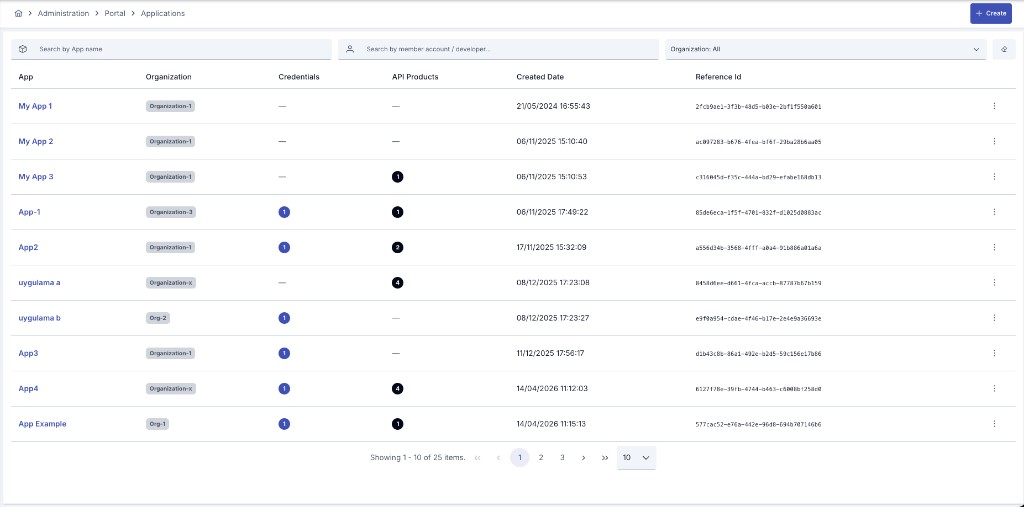
List
Create opens the new-app dialog.
Filters
| Filter | Description |
|---|---|
| Search by App name | Search by name |
| Search by member account / developer | Finds apps via ACTIVE org memberships matched by account email/name |
| Organization | One or more organizations |
| Type: All | Portal / Internal. Nothing selected = both kinds; the Manager list is kind-aware, not kind-filtered |
Columns
| Column | Description |
|---|---|
| App | Click name for view; description in tooltip |
| Type | Portal / Internal badge; an app with no stored type reads as Portal |
| Organization | Badge → org overview |
| Credentials / API Products | Count badges from list-stats |
| Created Date | Created timestamp |
| Reference Id | Unique reference |
Badges on name:
- Deletion requested — consumer deletion request (
PENDING_DELETION) - Archived — archived app
No list badge for ACTIVE / SUSPENDED. Suspend has no Manager UI (backend only).
Row menu (⋮)
- View · Edit · Remove (immediate hard delete)
- When
PENDING_DELETION: Approve & delete · Approve & archive · Reject
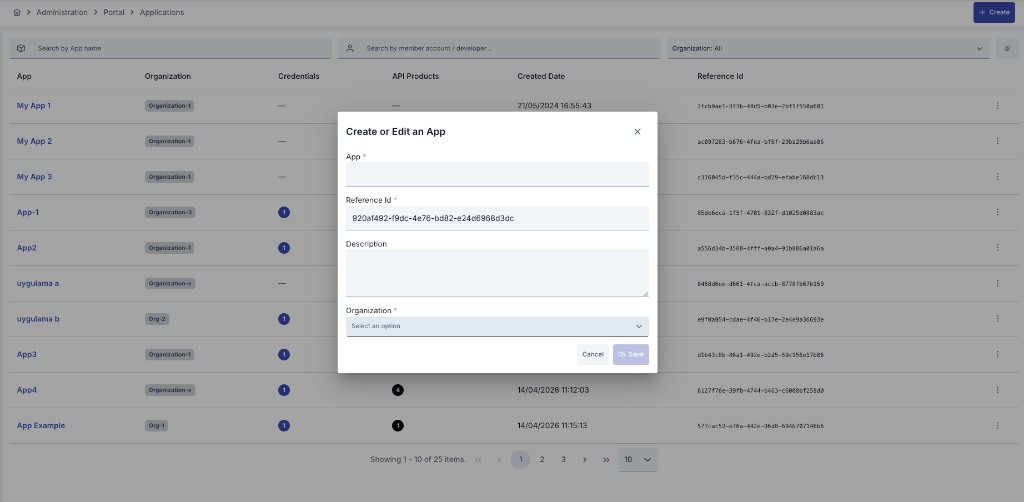
Create
| Field | Required | Notes |
|---|---|---|
| App (Name) | Yes | Max 255 |
| Type | Yes | Portal (default) / Internal — create only; read-only afterwards |
| Reference Id | Yes | Default UUID |
| Description | No | |
| Organization | Yes | There is no Account field |
Metadata, credentials, and product subscriptions are not in the create dialog; they are managed on edit/view. portalId / projectId come from the active portal context — except for an Internal app, which belongs to no portal and is therefore saved with no portalId.
Internal applications
An Internal app is a first-party application created by an administrator; it belongs to the Manager's own surface, not the portal's.
- It is created only here. The portal surface always stamps Portal on what it creates, whatever the request asks for
- It is never returned by portal-facing queries: consumer My Apps, the organization's app list, reports, and the Portal Management API
GET /portal-appall exclude it - An update sent for it through the portal surface is refused, and it cannot be promoted to production
- It does not consume the organization's
maxAppCountquota — that limit governs Portal apps only
View
Header: name, Organization badge, Created Date; Edit / Delete.
Stat cards: Credentials count, API Products count (products hidden in Identity mode).
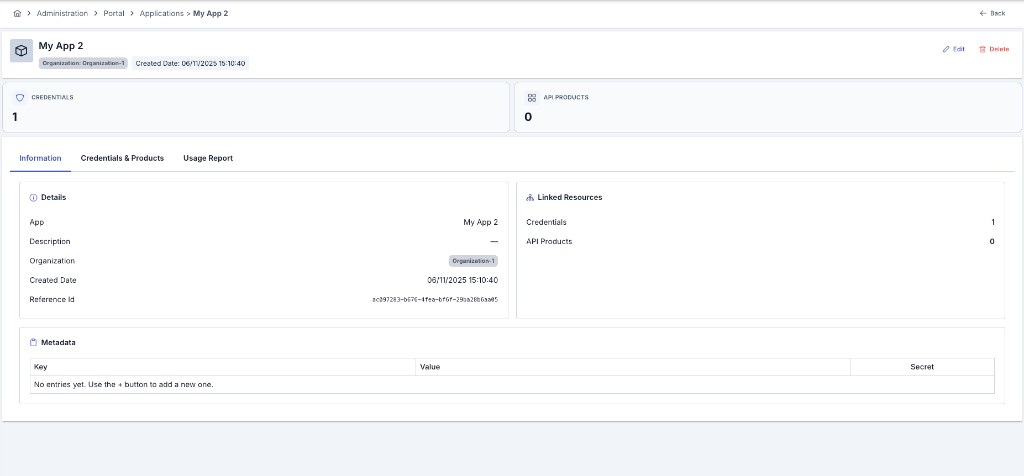
Information
- Details: name, type, application key (with copy), description, organization, created, referenceId (project in Identity), Do not log traffic (badge when on, "No" otherwise)
- Linked Resources: credential / product counts
- Metadata (read-only): Key, Value (secrets as
••••••••), Secret yes/no
Credentials & Products
- Credential chips (disabled ones secondary)
- Product chips: name · plan type · subscription status (no products in Identity)
Usage Report
App-scoped summary metrics panel (product filter + date range; successful / blocked / error / timing). For platform-wide views see API Traffic Report and Traffic & Usage.
Edit
Saved with Save and Deploy.
| Area | Editable? |
|---|---|
| Name, Description | Yes |
| Organization, Reference Id | No (read-only strip) |
| Type, Application Key | No (read-only strip; the server restores the stored value and answers 400 to a payload that carries a different one) |
| Do not log traffic | Yes — can be turned on/off after the app already exists, not only at creation. Saving redeploys the application's consumers automatically; no manual redeploy is needed |
| Metadata | Add/remove rows; key required and unique; value; secret + show/hide |
| API Keys / Credentials | Generate (opens a dialog asking how long the key should live — see below); table: apiKey, enabled, created, expire; Revoke |
| API Products | Plan/status visible; Unregister → UNSUBSCRIBED (new subscribe is not started here) |
Stops this application's consumers' API traffic from being written to traffic log connectors. Trace records, OpenTelemetry spans, metrics, and security/access events are not affected. Shown on View as a "Traffic log off" badge when on, or "No" when off.
Generate no longer mints a never-expiring key silently — it opens a small dialog first. Never expires is on by default, so the previous outcome is unchanged unless you turn it off; turning it off reveals a date picker and the new key expires on the chosen date, the same Expire Date field a Consumer's own key already uses.
Lifecycle
| State | How it appears | Manager actions |
|---|---|---|
| ACTIVE | Default / after Reject | Create, edit, direct Remove |
| PENDING_DELETION | Consumer deletion request (credentials disabled) | Approve & delete / Approve & archive / Reject |
| ARCHIVED | Approve & archive | Data kept; subscriptions unsubscribed |
| SUSPENDED | Backend only | No Manager UI |
Approve & delete permanently removes the app, credentials, ACLs, subscriptions, and gateway undeploy. Prefer archive to keep data.
Developer Portal
Consumer My Apps (create wizard, add subscription, Test only / Promote, deletion request) is documented on Application Promote. Manager does not approve promote on this page.
- An application always belongs to an organization. If an account without an organization tries to create one, the portal refuses with a readable message before anything is saved (the portal API on the Manager side enforces the same rule).
- An account whose organization is still awaiting approval sees a persistent notice on My Apps; the New application button stays disabled until the organization is approved.
- An action the account is not allowed to perform (for example a Viewer attempting a write, or access to another organization's application) no longer ends the session; the user only sees "You are not allowed to perform this action." and stays signed in.
When an app, API client, or subscription/plan action fails a business rule — for example a plan that no longer matches the product, a retired plan, an organization still awaiting approval, or a role without the required permission — the developer portal now shows the reason as a readable, translated sentence in the consumer's selected language instead of raw technical text. Generic server errors and "server unreachable" messages are unchanged.