Portal Organizations
What Is It For?
- Centrally manages consumer organizations in the portal context
- Shows members, subscriptions, applications, and usage together on the organization overview
- Handles risky or duplicate organizations safely via suspend, merge, and credential revoke
- Uses verified email domains so signups become join requests to the right organization
- Reduces incorrect manual edits on LDAP-sourced organizations with read-only fields
Who Uses It?
- Portal administrators: To manage the consumer organization inventory and lifecycle
- Support / operations: To see a troubled organization’s subscriptions and apps in one place
- Identity / security teams: To apply critical actions such as suspend, revoke, and merge
Access and Permissions
- In the admin panel follow Portal → Organizations
- The same list/create/edit/overview component also opens under Identity → Credential → Organizations
- From Portal you work in the active portal context; from Identity you work in the identity-management context
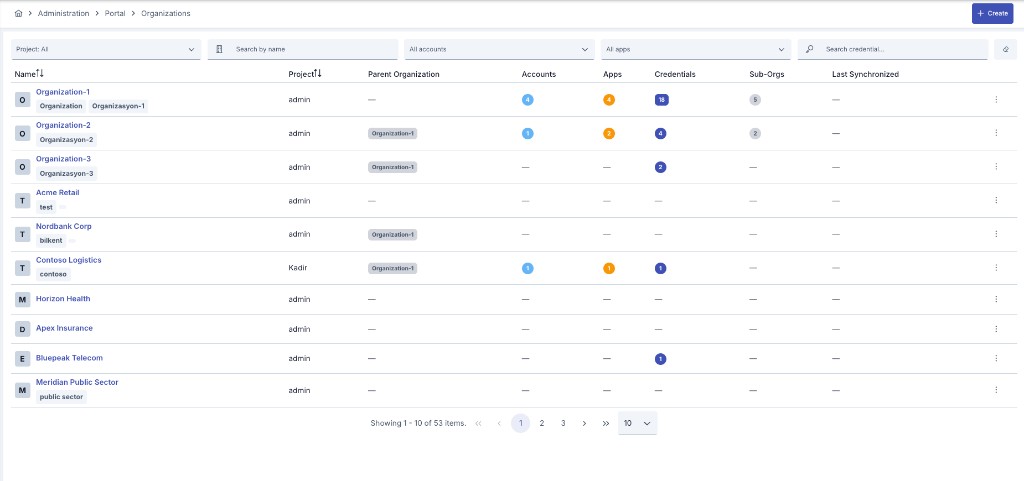
List
From the list you search organizations, approve/reject Pending signups (optional message), and open the overview.
Filters: Project, Search by name, accounts, apps, credential search. Columns include name, project, parent organization, account/app/credential/sub-org counts, and last synchronized.
Row menu (⋮): Overview · View · Edit · Duplicate · Delete · Move to Global — LDAP-sourced rows may restrict some actions / be read-only.
Overview — How to Read It
The header shows organization name, membership tenure, today’s request summary, and status badges (Suspended / Pending approval / Merged).
Critical operations
| Action | Effect |
|---|---|
| Suspend / Resume | Temporarily disables / restores the organization's application credentials; subscriptions and analytics are kept. While suspended, every API client owned by the organization's applications is also refused, on live traffic and at the token endpoint alike. Resume restores what was paused — but revives zero revoked credentials |
| Revoke credentials | Permanently revokes credentials; cannot be undone. The same action also reaches every API client in the organization's subtree: their already-issued tokens are killed the same two ways a single client's own revoke kills them — stored (opaque) tokens deleted, and a token cutoff stamped so an already-issued JWT stops validating too — see Owner and Client Lifecycle. Revoking neither lifts nor imposes a suspension — the two are independent axes, and the only way to lift a suspension is an explicit Resume |
| Merge into… | Merges into another organization; members, apps, and subscriptions move; irreversible |
Verified e-mail domains: Portal signups from these domains do not create a new organization — they become a join request. Member approval is done by an Owner on the Developer Portal → Portal Membership and Invitation.
Client secrets are never shown on this screen. Revoke and Merge are irreversible; confirm impact first. Delete can affect account access / apps / credentials.
Tabs
Information
Organization identity, source, notification emails, metadata (secrets masked). Accounts with roles; Subscriptions with plan and status (Active, Waiting for approval, Rejected, Disabled, Unsubscribed); Apps with registered products and credential metadata.
Adding a member on the Accounts tab: since a consumer organization is not tied to a single portal, the "add member" picker lists accounts from every portal that can reach the organization, not only the active one; accounts already a member of the organization are excluded automatically. Each row also shows the account's portal name so people with the same display name in different portals stay tellable apart.
Usage
Organization usage / quota summary plus a period API Traffic Report panel (product, app, date). Suitable for period comparison.
Traffic is attributed to an application whose identity is a typed API Client (client ID matching the traffic row's username/key), not only to one still carrying a legacy username/password credential.
Traffic & Usage
Org-scoped live traffic and quota view (Last ~1 hour / 24h / 7d, refresh, KPIs, charts, traffic table + drawer). This is the organization-scoped counterpart of platform Traffic & Usage.
Roles and Statuses
| Role | Meaning (portal membership) |
|---|---|
| Owner | Member management + write access |
| Developer | App / subscription / credential write |
| Viewer | Read-only; does not see client secrets |
Organization status: Active · Pending approval · Rejected · Merged
Usage Scenarios
- Suspend a consumer organization whose contract has ended
- Merge two duplicate organizations into one inventory
- Confirm quota overrun on Usage for an organization that opened a support ticket
- On LDAP-sourced orgs, treat code/name as read-only and use operational actions only