SIEM & Log Forwarding
Reach this screen by following Administration → System Settings → SIEM & Log Forwarding. Only users with the Administrator (Admin) role can open it. Click Save and Deploy to save; changes are pushed to the running Gateway environments immediately.
Overview
Apinizer's configuration database is the system of record for audit, session, token and application events. Whatever you forward to a SIEM is a copy, produced for correlation, alerting and long-term archiving on your side.
The delivery contract is best effort:
- Events are handed to the connector on the path that produced them; the connector buffers and sends them.
- When a connector's queue is full, events are dropped rather than blocking the request that produced them.
- Over UDP and plain TCP syslog, "delivered" cannot be observed. For that reason the test button reports Queued, not Sent, for syslog destinations.
- Nothing is retried from a durable outbox. If the SIEM was unreachable, the record is still in the Apinizer database — it is not in your SIEM.
Do not design a compliance control that depends on the SIEM copy alone. Query the Apinizer database (Audit Records, Login Records, Token Requests, Application Logs) when you need the authoritative answer, and use the SIEM copy for correlation and alerting.
Concepts
Streams
A stream is one family of events. Each stream has its own producer, its own collection in the Apinizer database, its own event types and its own way of deriving an outcome.
| Stream | What it records | Apinizer database collection | Event types | Outcome |
|---|---|---|---|---|
| Audit | Administrative changes, Management Console requests, rejected requests, sensitive-access events (secret disclosure, package export, API token lifecycle, PII unmask), and operation events (deployments, promotion executions, ACL grants and revokes) | audit_event | ENTITY, MANAGER_REQUEST, ACCESS_DENIED, SECRET_REVEALED, EXPORT, API_TOKEN_CREATED, API_TOKEN_REVOKED, PII_UNMASK, DEPLOY, UNDEPLOY, PROMOTION_REQUESTED, PROMOTION_APPROVED, PROMOTION_REJECTED, PROMOTION_STARTED, PROMOTION_EXECUTED, PROMOTION_CANCELLED, ACL_GRANT, ACL_REVOKE | SUCCESS, FAILURE, DENIED |
| Session | Management Console and API Portal sign-in, sign-out, token refresh, lockout, and the password lifecycle of a locally managed user | persistent_audit_event | LOGIN_SUCCESS, LOGIN_FAILURE, LOGOUT, TOKEN_REFRESH_SUCCESS, TOKEN_REFRESH_FAILURE, ACCOUNT_LOCKED, PASSWORD_CHANGED, PASSWORD_CHANGE_REQUIRED, PASSWORD_POLICY_VIOLATION | derived from the event type; ACCOUNT_LOCKED is DENIED, PASSWORD_POLICY_VIOLATION is FAILURE, the rest are SUCCESS |
| Token | Token issuance, refresh and rejection on the Gateway | log_tokentraffic | TOKEN_ISSUED, TOKEN_REFRESHED, TOKEN_REJECTED | SUCCESS when there is no error, FAILURE when there is; authentication errors are DENIED |
| Application | Component logs from the Management Console, Gateway, Cache and Integration modules | apinizer_log | LOG.TRACE … LOG.ERROR | WARN and ERROR are FAILURE, everything else SUCCESS |
| API Security | Gateway requests blocked by a policy or failed with an error, across HTTP, gRPC and WebSocket traffic | log_apisecurityevent | AUTHENTICATION, AUTHORIZATION, QUOTA, THROTTLING, VALIDATION, IP_SECURITY, THREAT, ROUTING, GATEWAY, OTHER | DENIED when the request was blocked, FAILURE when it errored |
| API Access | Every request that passes through the Gateway — successful ones included — as bodiless metadata, across HTTP, gRPC and WebSocket traffic | log_apiaccess | the same ten categories as API Security | SUCCESS when the request completed, DENIED when it was blocked, FAILURE when it errored |
| Portal | The API Portal's own domain events — an application registered or removed, a subscription requested/approved/rejected/cancelled, an organization membership or join request managed, a support ticket opened, a personal API access token created or revoked | audit_event (the same collection as Audit — see Portal Events) | PORTAL_APP_CREATED, PORTAL_APP_DELETED, PORTAL_SUBSCRIPTION_REQUESTED, PORTAL_SUBSCRIPTION_APPROVED, PORTAL_SUBSCRIPTION_REJECTED, PORTAL_SUBSCRIPTION_CANCELLED, PORTAL_ORG_MEMBER_INVITED, PORTAL_ORG_MEMBER_ADDED, PORTAL_ORG_MEMBER_ROLE_CHANGED, PORTAL_ORG_MEMBER_REMOVED, PORTAL_ORG_JOIN_REQUESTED, PORTAL_ORG_JOIN_APPROVED, PORTAL_ORG_JOIN_REJECTED, PORTAL_TICKET_CREATED, PORTAL_API_TOKEN_CREATED, PORTAL_API_TOKEN_REVOKED | SUCCESS, FAILURE, DENIED |
Portal sign-ins and sign-outs are not part of the Portal stream — they are Session events, physically recorded in a separate collection, portal_login_logs, rather than persistent_audit_event. A PORTAL_LOGIN_SUCCESS, PORTAL_LOGIN_FAILURE, PORTAL_LOGOUT, PORTAL_ACCOUNT_LOCKED, PORTAL_ACCOUNT_UNLOCKED, PORTAL_PASSWORD_CHANGED, PORTAL_PASSWORD_CHANGE_REQUIRED, PORTAL_PASSWORD_RESET_REQUESTED, PORTAL_PASSWORD_POLICY_VIOLATION or PORTAL_ACCOUNT_DISABLED event type on the Session row above carries source.component: PORTAL and data.portalId, so a rule can select or exclude portal sign-ins without touching Management Console ones — see API Portal Login Logs for the full catalog (ten types in all). PORTAL_ACCOUNT_DISABLED is written only by the inactive-account job so far; PORTAL_ACCOUNT_UNLOCKED only by an administrator's explicit Unlock on Accounts/Developers — a lock that simply expires on its own writes no event of its own, the sign-in row that follows says what happened.
API Access produces one event per request, so it grows at the rate of your traffic rather than at the rate of your incidents. Two switches govern it, and both are off by default:
- Local storage — whether the events are written to the
log_apiaccesscollection at all, on the Streams tab. Turning it on asks for confirmation, because from that moment every request costs a database write. - Authority — whether the stream is dispatched from the destinations on this page.
Before you turn either on, set a short retention for the collection — 3 to 7 days is the recommendation — from the API Access Events row on Application Log Cleanup Tasks, and consider sampling the rule that forwards it.
A request that a policy blocks or that ends in an error produces both an API Security event and an API Access event — the two streams overlap on purpose, so that a destination can subscribe to security incidents without the traffic, or to the traffic without duplicating incidents.
If you forward both streams to the same destination, set Outcomes to SUCCESS on the API Access rule. The API Security rule then carries the blocked and failed requests and the API Access rule carries only the successful ones, and nothing is counted twice.
Full traffic logs — the ones with request and response payloads — are still a separate mechanism and are not part of the SIEM streams; they continue to be forwarded by the log connectors of the Gateway environment. An API Access event is metadata only and never carries a body, a header or a query string.
Destinations
A destination is one connector plus everything that is applied before an event reaches it:
| Part | Meaning |
|---|---|
| Connector | The connection configuration that carries the payload — Syslog, Kafka, Webhook, RabbitMQ, ActiveMQ, Logback, Elasticsearch, Graylog or a database connector. |
| Payload profile | The format of the payload. See below. |
| Stream rules | Per stream: whether the stream is sent to this destination at all, and which of its events are selected. |
| Privacy profile | Optional masking, hashing, deletion or encryption applied to the payload before it leaves Apinizer. |
| Size policy | Optional maximum event size and what happens when an event exceeds it. |
A destination that has no rule for a stream never receives that stream. The same connection configuration can be used by several destinations.
Payload profiles
| Profile | What it produces | Available for |
|---|---|---|
| Legacy Raw | Today's output for your connector type, unchanged — a database connector still writes SQL columns, a Graylog connector still writes a GELF message, an Elasticsearch connector still writes its own document, and the string-based connectors still receive the same JSON they receive today. The field list is frozen: fields added to Apinizer in later versions do not appear in this output. | Every connector type |
| Apinizer JSON v2 | The canonical envelope described under Schema v2 — a stable field order, a typed field allowlist, a severity value, and a data object that carries only the fields explicitly permitted for that stream. | Syslog, Kafka, Webhook, RabbitMQ, ActiveMQ, Logback, Elasticsearch, Graylog |
| CEF 0 | A single-line ArcSight Common Event Format record, produced from the v2 envelope after the privacy profile and the size policy have been applied. See CEF and LEEF. | Syslog |
| LEEF 2.0 | A single-line, tab-separated IBM QRadar Log Event Extended Format record, produced the same way. See CEF and LEEF. | Syslog |
Database connectors write into fixed table columns and therefore cannot carry the v2 envelope; they stay on Legacy Raw. Privacy profiles and size policies are applied on every profile except Legacy Raw, so a destination that needs masking must be switched to Apinizer JSON v2, CEF 0 or LEEF 2.0.
Legacy Raw is kept byte-for-byte compatible so an existing SIEM parser keeps working after the upgrade. It also keeps whatever it emits today, including fields such as the token log's clientInfo. The v2 profile is where the field list is curated: token values, passwords, and Authorization, Cookie and API-key headers are never part of it, and any remaining field whose name looks like a credential is dropped a second time before the payload is sent.
Authority
Every stream is served by exactly one of two sources, and you switch between them per stream:
| Authority | Where the destinations come from | Are rules applied? |
|---|---|---|
| Legacy | The recipient lists that were previously configured under General Settings | No — every event goes to every recipient, exactly as before the upgrade |
| Active | The destinations on this page | Yes — rules, payload profile, privacy profile and size policy all apply |
Switching a stream is immediate in both directions, so you can move one stream at a time and roll it back without losing events.
The Portal stream has no legacy recipient list to fall back to — its sixteen domain events simply reach no destination while it is on Legacy (which is also its default after an upgrade). Switch it to Active to start forwarding them at all. Portal sign-ins and sign-outs are unaffected by this switch: they follow the Session stream's authority instead, as explained under Migration and cutover below.
The page
The page has three tabs.
Destinations
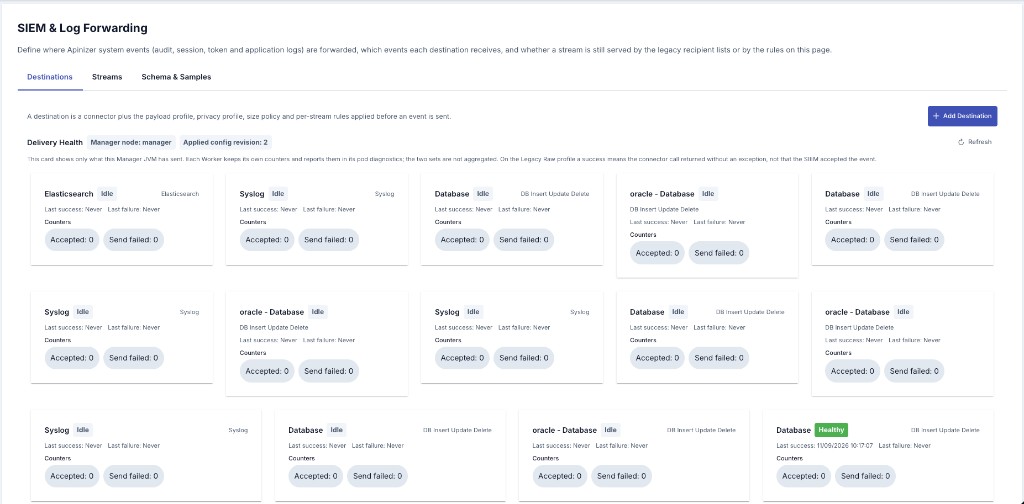
The destination list shows the name, the connector type and connection configuration, the payload profile, a badge for every stream routed to it, and whether it is enabled. Add Destination opens the destination dialog, where you configure:
- Name, Description and the Enabled switch.
- Connector — Select Connector opens the same connector editor used elsewhere in Apinizer; Edit Connector reopens it for an existing destination.
- Payload Profile — the list is filtered by connector type. CEF 0 and LEEF 2.0 are single-line syslog formats and are offered only when the destination's connector is a Syslog connector.
- Size Policy — Limit event size, the maximum event size in bytes, and the action taken when the limit is exceeded.
- Privacy Profile — Apply privacy profile plus Apply recommended SIEM profile, which fills in the identity rules for you.
- Stream Rules — one section per stream, each starting with Send this stream to this destination.
A Database destination's connector uses the same Operation field as the Gateway Runtime connectors — only Insert-Update-Delete is offered, regardless of database type. See Adding Log Connectors for details.
Use Send test event on a saved destination to verify connectivity before you switch a stream over.
Streams
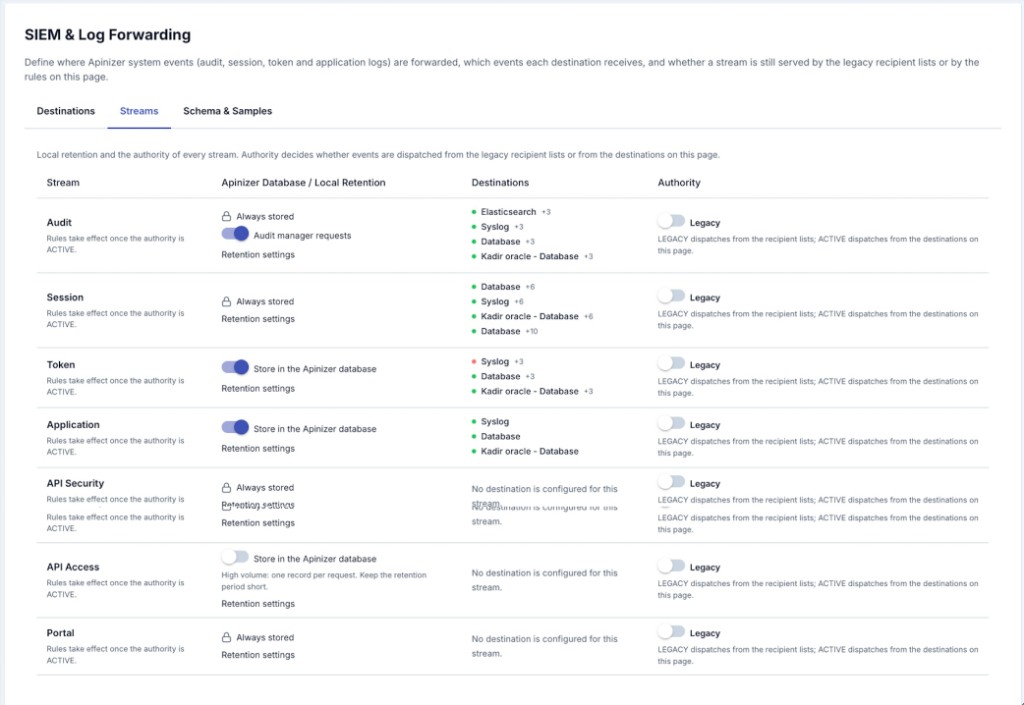
One row per stream, with four columns:
| Column | What it does |
|---|---|
| Stream | The stream's name. A stream that exists in the platform but is not configurable yet would carry a Planned badge; as of this release every stream is configurable. |
| Apinizer Database / Local Retention | Whether the stream is stored locally, plus a Retention settings link to the retention configuration for that log family. Audit, Session, API Security and Portal are marked Always stored and cannot be turned off. Token and Application have a Store in the Apinizer database switch that is on by default. API Access has the same switch but it is off by default and asks for confirmation before it is turned on — see the warning above. The Audit row also carries the Audit manager requests switch, which remains a General Settings value and controls whether Management Console requests are recorded at all. |
| Destinations | A summary of the rule for each destination configured for that stream. When no destination is configured the cell says so, and streams still on Legacy show Rules take effect once the authority is ACTIVE. |
| Authority | The Legacy ⇄ Active switch, with a confirmation dialog and the recommended cutover order. The switch is saved on its own, immediately, and it carries over only what has already been saved: destination edits you have not saved yet stay on screen but are not part of the cutover, and the dialog says so. Save them first if the switch should cover them. |
Schema & Samples
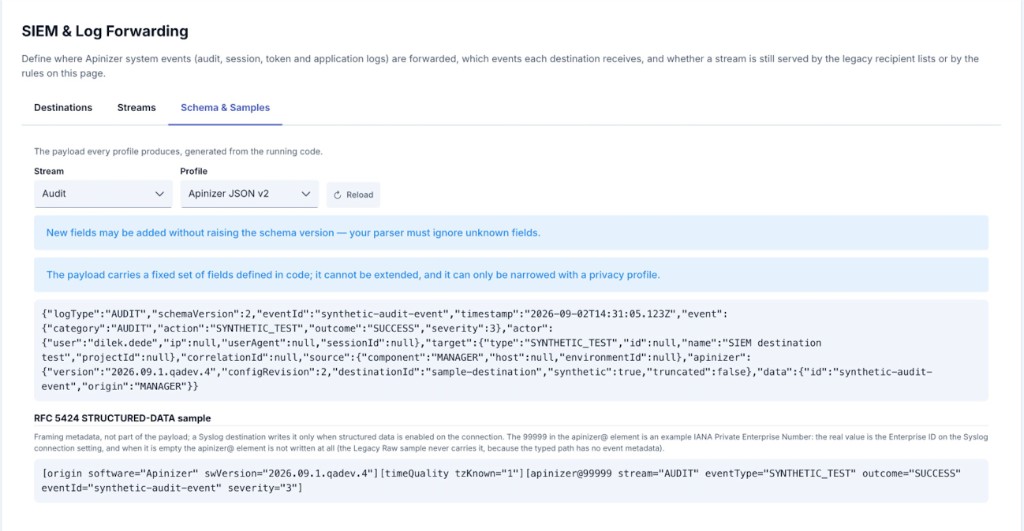
Pick a stream and a profile and the tab renders the payload the running platform produces for that combination, together with the field allowlist. All four profiles can be previewed here, including the CEF and LEEF lines, independently of which connector the destination actually uses. Use it to build your parser, and read the note next to it: new fields may be added without raising the schema version, so your parser must ignore unknown fields.
Below the payload the tab also shows the RFC 5424 STRUCTURED-DATA sample — the framing metadata a Syslog connection writes when structured data is enabled on it. It is not part of the payload. The number in the apinizer@ element of the sample is an example: the real value is the Enterprise Number (PEN) on the Syslog connection, and when that field is empty the element is not written at all.
Rules
Rules are evaluated at the source, on the path that produced the event, before anything is handed to a connector. There is no scripting and no regular expression matching — the evaluation is a fixed sequence of checks, so it stays cheap even on the token path.
Evaluation order
| Step | Check | Result when it matches |
|---|---|---|
| 1 | The rule is switched off | Not sent |
| 2 | The event type is in Excluded event types | Not sent — exclusion always wins over inclusion |
| 3 | Included event types is not empty and does not contain the event type | Not sent |
| 4 | Any dimension of Scope — exclude matches | Not sent |
| 5 | Scope — include is not empty and no dimension matches | Not sent |
| 6 | The threshold rejects the event — Minimum level for Application, Outcomes for every other stream | Not sent |
| 7 | Sample percent is set (API Access only) and this event is not in the sampled share | Not sent — sampled out |
| 8 | Maximum events per second has been exhausted for this second | Throttled |
| 9 | — | Sent |
An empty list always means everything: no included event types means every type, no outcomes means every outcome, no scope means every event. Within Scope — include the dimensions are combined with OR — the event has to match at least one filled dimension — while an event matching any dimension of Scope — exclude is dropped.
Sampling
The Sample percent field appears on the API Access rule only, and it is the knob that makes a per-request stream affordable for a SIEM that is priced or sized by event count. Leave it empty to forward every event that matched the rule; set it to 10 to forward roughly a tenth of them.
Two things about it are worth being precise on:
- It thins forwarding, never storage. Sampling decides what leaves for the destination. It does not affect what is written to the
log_apiaccesscollection — that is governed solely by the local storage switch, so the Security Events screen keeps showing every event regardless of the sample percent. - The decision is deterministic, not random. It is derived from the event's own identifier, so the same event always gets the same verdict, and a request either reaches every destination that sampled it in or none of them. Re-evaluating the same event never flips the result.
Sampling is the wrong tool for reducing a specific kind of noise — use Outcomes, Scope — include or Scope — exclude for that, and keep sampling for the case where you want a representative slice of everything.
Sampling is not compatible with using API Access as an audit trail. A sampled destination holds a statistical picture of your traffic, not a complete one; do not point a compliance report at it.
Scope dimensions
| Dimension | Matched against | Streams where it is meaningful |
|---|---|---|
| Project ids | The project the affected object belongs to | Audit, Session, Token |
| API proxy ids, API proxy names | The API proxy the event belongs to | Token, Application |
| HTTP methods | The HTTP method of the token request | Token |
| Credentials | The credential or client key that requested the token | Token |
| Environment ids | The environment that produced the event | Token, Application |
| Components | The Apinizer component that wrote the log — Manager, Gateway, Cache, Integration, Portal | Application |
| Client CIDR blocks | The client IP address, matched against IPv4 or IPv6 CIDR blocks | Audit, Session, Token |
| Portal ids | The API Portal the event belongs to | Session (portal sign-in/sign-out events only), Portal |
Names are matched case-insensitively; identifiers must match exactly.
Management Console request and access-denied audit events belong to no project. If you fill Project ids with a project identifier, those events stop matching and disappear from that destination. To keep them, add the literal value admin to the list — it selects the events that have no project.
Management Console sign-ins have no Portal ids to match, and portal sign-ins have no Project ids to match — a filled-in Portal ids scope on the Session stream selects only the portal side of it, exactly the way Project ids already selects only the Management Console side.
Examples
| Goal | How to configure it |
|---|---|
| Send only failed and rejected administrative operations | Audit rule → Outcomes: FAILURE, DENIED |
| Keep the high-volume Management Console request stream out of a destination | Audit rule → Excluded event types: MANAGER_REQUEST |
| Forward only one project's events | Audit rule → Scope — include → Project ids: the project identifier (add admin as well to keep platform-level events) |
| Forward warnings and errors only | Application rule → Minimum level: WARN |
| Protect a shared syslog target from a token burst | Token rule → Maximum events per second: 200 |
| Forward successful API traffic without duplicating the security incidents | API Access rule → Outcomes: SUCCESS (leave the API Security rule to carry the blocked and failed requests) |
| Keep a per-request stream affordable on a metered SIEM | API Access rule → Sample percent: 10 — roughly a tenth of the matching events is forwarded, the collection still stores all of them |
| Send token rejections only | Token rule → Included event types: TOKEN_REJECTED |
| Forward only one portal's sign-ins/sign-outs | Session rule → Scope — include → Portal ids: the portal identifier |
| Forward a portal's application/subscription/ticket activity but not its sign-ins | Portal rule with no scope restriction; leave the Session rule for that destination off (or scoped to a different portal) |
Rules apply only to streams whose authority is Active. While a stream is on Legacy, every recipient of the legacy list still receives every event.
Privacy profile
Sensitive data is handled in two layers.
The first layer cannot be turned off. Token values, passwords and password hashes, Authorization, Cookie and Set-Cookie headers, API-key headers, query strings, certificate and key material, and the privacy salt itself are never part of a v2 payload. They are not in the allowlist, and a second check removes any remaining field whose name resembles a credential. The same check runs over the change list described under Fields per stream: a changed field whose name resembles a credential carries "[REDACTED]" in place of both the old and the new value. The token-signing key of a Gateway Runtime (the RSA private key shown on the JWT Token Validation Keys tab) belongs to this layer as well: it appears neither in the environment's audit record, nor in the change list, nor in a captured request body.
The second layer is the privacy profile you configure per destination. It is optional and it applies on every profile except Legacy Raw, after the envelope has been produced and before the size policy runs. On a CEF 0 or LEEF 2.0 destination it therefore runs before the line is formatted, so a masked field reaches the line already masked. Each rule targets an envelope field by name, by regular expression, or by built-in PII type (national identity number, IBAN, e-mail address, phone number, card number) and applies one operation: mask, hash, delete, encrypt or detect.
The recommended profile, applied with a single click in the destination dialog, hashes the identity fields — user, email and the credential name — leaves the IP address readable, and runs built-in PII detection over the free-text fields.
A destination you are creating starts with masking already on for the API Security stream. The moment you switch that stream on for a new destination, its privacy profile is filled with three built-in PII rules — Turkish identity number, Turkish IBAN and card number — each set to mask. An API Security event carries no body, but its credential and path fields can still hold an identifier a caller typed into a URL or sent as a quota key. The three rules appear in the destination's privacy table and you can remove any of them before saving. Nothing is applied to a destination that already exists, a profile you emptied or switched off yourself is never overwritten, and removing the stream rule later does not remove the profile — from that point on it is ordinary configuration. The same default is applied on the server, so a destination created through the API rather than this page is protected too. Note that a privacy profile belongs to the destination, not to one stream: if that destination also forwards Audit, Session or Application events, these three rules apply to them as well.
| Rule of thumb | Why |
|---|---|
| Hash identities instead of deleting them | A salted hash keeps the same user consistent across events, so correlation and user-based alerting still work. |
| Leave the IP address readable | Most SIEM detections — impossible travel, brute force, unusual source — are built on it. |
| Do not mask everything | Excessive masking removes the very signals your SIEM needs; an over-masked feed passes an audit and detects nothing. |
| Set a salt before you use hashing | A hash rule without a salt is rejected. |
| Rotate the salt deliberately | After a rotation the same user hashes to a different value, so pseudonym correlation across the rotation boundary is broken. Plan it with your SIEM team. |
If masking fails for an event, that event is not sent at all rather than sent unmasked. Losing a copy is preferred over leaking sensitive data. These events are counted separately so you can see them.
The envelope's structural fields — logType, schemaVersion, timestamp, everything under event, and everything under apinizer — are protected. A privacy rule that targets them is ignored, because masking them would break every parser downstream.
Privacy profiles are not applied to Legacy Raw destinations, which reproduce today's output exactly. Switch the destination to Apinizer JSON v2, CEF 0 or LEEF 2.0 if you need masking.
Size policy
The size policy applies on every profile except Legacy Raw and bounds the UTF-8 size of the whole payload, envelope included. On a CEF 0 or LEEF 2.0 destination it is applied to the envelope before the line is formatted; a formatted line that is still over the limit is dropped rather than shortened a second time.
| Setting | Behaviour |
|---|---|
| Off (default) | No limit — the same behaviour as before the upgrade. |
| Truncate data | The bulk fields inside data — reference, message, stackTrace, changes — are shortened largest-first until the payload fits, each one marked with a truncation note, and apinizer.truncated is set to true. The envelope fields are never touched. If truncation is not enough, the event is dropped. |
| Drop the event | The event is not sent and is counted as an oversize drop. |
| Replace data with a hash | data is replaced by its SHA-256 digest and byte count, so the event is still correlatable but carries no payload. |
The minimum you can configure is 1024 bytes. For syslog destinations, 8192 bytes with Truncate data is a good starting point — most RFC 5424 receivers accept between 2 and 8 KB per message and silently cut anything longer. Kafka, Webhook and Elasticsearch destinations normally need no limit.
Application stack traces, audit reference objects and audit change lists are the fields that make an event large. All three are opt-in or bounded: the reference object is off by default on the Audit stream, the change list is on by default but is already capped before this policy ever runs — at most 200 entries, each value cut at 512 characters, the whole list at 512 KB — and the stack trace switch on the Application stream can be turned off for a destination that does not need it.
This is a different control from the Max Message Size (Bytes) on a Syslog connection itself. This size policy shortens, drops or hashes the event's content so it fits a target size; the Syslog connection's setting instead keeps all of the content and splits an oversized message into several syslog messages. See Splitting Oversized Messages for how the two relate when a destination uses both.
Migration and cutover
What the upgrade did
When you upgraded, every recipient that was configured under General Settings for application, token, audit and login logs became a destination on this page:
- One destination per recipient, keeping its connector configuration and its identity unchanged.
- The payload profile set to Legacy Raw, no privacy profile and no size policy — the output is identical to what your SIEM received before the upgrade.
- A rule for the stream that recipient served, whose Included event types lists every event type that existed at the time of the upgrade (the Application stream is the exception — it is filtered by level, so its list is left empty). Your SIEM therefore keeps receiving exactly what it received before, and nothing more.
- The local storage switches for token and application logs copied across.
- Every stream left on Legacy authority, so nothing changed until you decide otherwise.
On a fresh installation, where there were no recipient lists to preserve, every stream starts on Active — not only the four streams that could have had a legacy recipient list, but also API Security, API Access and Portal, which never had one to migrate.
Because a migrated rule carries an explicit list of event types, event types introduced in later Apinizer versions are not forwarded through that rule until you add them. This is deliberate: a migrated feed never grows without an administrator's decision. A rule you write yourself, leaving Included event types empty, forwards every type including the ones added later.
Cutting a stream over
- Open the destination for that stream and review its rule — event types, outcomes, scope and the events-per-second limit.
- Optionally switch it to Apinizer JSON v2 — or, on a Syslog destination, to CEF 0 or LEEF 2.0 — and confirm the payload on the Schema & Samples tab with your SIEM team.
- Send a test event and confirm it arrives.
- On the Streams tab, switch the stream's authority to Active.
- Watch the counters and your SIEM for a few minutes before moving to the next stream.
The recommended order is Audit → Session → Token → Application: lowest volume first, highest and burstiest last.
Rolling back
Switching a stream back to Legacy takes effect immediately. The legacy recipient lists are kept in step with this page on every save, so they are always current and nothing is lost in either direction.
The same mechanism makes a rolling upgrade safe. A node running the previous version does not know about this page and reads the legacy lists, which are up to date — it forwards the same events, it simply does not apply rules, privacy profiles or size policies until it is upgraded.
Portal sign-in delivery
Before this stream existed, each API Portal had its own, separate recipient list for login/logout events, configured on that portal's Settings → Login Log tab. Upgrading to this version left that list exactly as it was and copied it here: for every connector on a portal's list, a destination now exists on this page with a Session rule scoped to that one portal (Portal ids) and limited to the ten event types a portal produces — nothing else that portal's connector used to receive changes. A destination migrated before this version added the lockout/password-lifecycle event types keeps the include list it was given at the time — a newly introduced Session event type is never appended to an existing rule's included list automatically (the same rule as for every other stream, below), so an already-migrated destination with a non-empty include list does not start receiving PORTAL_ACCOUNT_UNLOCKED (or the other password-lifecycle types) on its own; a rule left with an empty include list always picks up new types.
Which list is actually live is decided by the Session stream's authority, not the Portal stream's:
- Legacy (the default after upgrade): each portal's own recipient list is used exactly as before — this page's copies of it exist but are inert.
- Active: the per-portal recipient lists are no longer used at all, for any portal at once; every portal sign-in and sign-out is delivered by this page's destinations and rules instead, including the copies the upgrade created.
There is no per-portal switch — cutting Session over to Active retires every portal's legacy list in the same step, which is why the Login Log tab on each portal shows an informational note once you do.
The recipient lists and the two local storage switches are now owned by this page. Values sent for them through the General Settings screen, the Management APIs or APIops are ignored, and so are the values in a whole-project configuration import. Configure them here — this page's own configuration can be moved to another installation on its own, as the SIEM Settings type in the Export/Import wizard; see Export and import below.
Local storage and retention
The first column of the Streams tab answers a different question from everything else on the page: not where is the copy sent, but is the record kept in the Apinizer database at all.
| Stream | Local storage | Retention today |
|---|---|---|
| Audit | Always stored — cannot be turned off | Configurable under the Audit Records row on Application Log Cleanup Tasks; off by default (365 days once enabled). |
| Session | Always stored — cannot be turned off | Configurable under the Login Records row on Application Log Cleanup Tasks; off by default (365 days once enabled). |
| Token | Switchable | Configurable under Log Retention; off by default. |
| Application | Switchable | Configurable per component under Log Retention and through the Application Log Cleanup Tasks page; off by default. |
| API Security | Always stored — cannot be turned off | Configurable under Log Retention and through the Application Log Cleanup Tasks page; off by default. |
| API Access | Switchable — off by default, asks for confirmation before it is turned on | Configurable under the API Access Events row on Application Log Cleanup Tasks; off by default (3 to 7 days recommended, since one row is written per request). |
| Portal | Always stored — cannot be turned off | Shares the audit_event collection with Audit above, so it shares the same Audit Records retention row on Application Log Cleanup Tasks; the sixteen domain events are not covered by the Portal Login Logs retention switch described below, which only removes sign-in/sign-out records. |
Turning off local storage for the token or application stream means the Apinizer database no longer holds those records, and the Token Requests and Application Logs pages stop showing them. Do it only when at least one destination is confirmed to be receiving them.
The Session row above is only the full picture for Management Console sign-ins. Portal sign-ins and sign-outs live in a separate collection, portal_login_logs, which — unlike persistent_audit_event — does have a retention switch: Portal Login Logs under Application Log Cleanup Tasks, off by default. Turning it on removes old portal sign-in/sign-out records only; administrator sign-ins in persistent_audit_event are unaffected either way.
Export and import
This page's whole configuration — every destination and both local storage switches — can be moved to another Apinizer installation as the SIEM Settings type in the Export/Import wizard. Only a system administrator can export or import it, whether through the wizard or through APIops, and it is reachable only from Administration → Export/Import — a project's own Export/Import menu never lists it, because this configuration has no owning project.
- A destination's connector — the connection configuration it sends to, and its failover connection when it has one — travels as a dependency, the same way a connector travels for any other type. Package it along, or let the wizard map it by name to a connection configuration that already exists on the target.
- The stream authority (Legacy/Active) never travels. Importing a package never cuts a stream over on the target; only this page, on the target itself, can do that.
- Replace Existing replaces the target's destination list wholesale with the package's and takes both local storage switches from the package; the target's own stream authority is left as it is. Import as New appends the package's destinations to the target's list instead — a name already in use there gets an
-importedsuffix — and leaves the target's own local storage switches and stream authority untouched. - The wizard asks only for the target, never for a new name or a Portal. The SIEM configuration is a single installation-wide object, so Import as New does not ask you to rename it — only the destinations inside it get the
-importedsuffix — and the upload step has no Target Portal choice; that choice belongs to Portal-scoped types such as API Products. - A destination whose connector cannot be resolved on the target — not packaged, and no connection of the same name and type on the target either — still imports, with Enabled turned off, and the import result names the destination and the connection that could not be found; it is never imported active with a broken reference, and it is never silently dropped. The same applies to a destination's failover connection.
- A destination created by Import as New that sends the API Security stream, and carries no privacy profile of its own, is seeded with the same masking rules described under Privacy profile above, exactly as one created directly on this page is.
- The privacy salt travels in the package as plain text, unchanged — the same way a connector's salt already travels inside other packages today. That is deliberate: two installations only hash the same value to the same result when they share the salt. If the package might sit somewhere shared, such as a CI repository, export it with a passphrase — see Package Encryption on the Export/Import wizard page.
For the full behavior — what belongs to the package, how a name collision is handled, how server-managed fields are treated — see SIEM Settings on the Export/Import wizard page.
Session stream — event types and legacy payload
The Streams table above names the Session event types; this section describes what each one means and exactly what a Legacy Raw destination receives for them. It applies to Management Console sign-ins. Portal sign-ins travel on the same stream but carry their own event names and their own payload shape — see API Portal Login Logs for those.
Whichever authority is in force, a Session record is always written to the Apinizer database (persistent_audit_event for the Management Console, portal_login_logs for a portal) and that cannot be turned off. A destination is an additional copy sent alongside the database write, never instead of it.
Management Console event types
| Event | eventType | Description |
|---|---|---|
| Successful login | LOGIN_SUCCESS | Username and password verified |
| Failed login | LOGIN_FAILURE | Invalid credentials or locked account |
| Sign-out | LOGOUT | The user signed out of the Management Console |
| Token refresh (project switch) | TOKEN_REFRESH_SUCCESS | The session token was renewed for a different project |
| Token refresh denied | TOKEN_REFRESH_FAILURE | The user has no permission in the requested project (reasonCode=NO_PROJECT_PERMISSION) |
| Account locked | ACCOUNT_LOCKED | The account was locked after too many failed attempts |
| Password changed | PASSWORD_CHANGED | A user's password was set or changed — by the account holder or by an administrator |
| Password change required | PASSWORD_CHANGE_REQUIRED | The user signed in with a password that must be changed before anything else can be done |
| Password policy violation | PASSWORD_POLICY_VIOLATION | A password was rejected for not meeting the configured password policy |
Every event also carries userAgent, and a failed event carries a machine-readable reasonCode. See Login Records for the full field and reason-code reference.
Legacy Raw payload
This is what the Legacy Raw profile produces; its field list is frozen and does not grow in later versions. Switch the destination to Apinizer JSON v2 for the canonical envelope, the shared actor/target blocks and field-level privacy — see Schema v2.
{
  "source": "API_MANAGER",
  "principal": "username",
  "email": null,
  "displayName": null,
  "eventDate": "2026-03-31T10:00:00Z",
  "eventType": "LOGIN_SUCCESS",
  "remoteAddress": "1.2.3.4",
  "message": null,
  "errorType": null,
  "portalId": null,
  "accountId": null
}
A failed sign-in fills message and errorType:
{
  "source": "API_MANAGER",
  "principal": "username",
  "email": null,
  "displayName": null,
  "eventDate": "2026-03-31T10:01:00Z",
  "eventType": "LOGIN_FAILURE",
  "remoteAddress": "1.2.3.4",
  "message": "Bad credentials",
  "errorType": "org.springframework.security.authentication.BadCredentialsException",
  "portalId": null,
  "accountId": null
}
Graylog destinations receive the same event as a GELF message whose short message is LogLogin. With Append to Message on, the JSON above is written to the GELF full_message field; with Append to Attributes on, each populated field (source, principal, email, displayName, eventDate, eventType, remoteAddress, message, errorType, portalId, accountId, userAgent, reasonCode, targetProjectId) is sent as a separate GELF additional field. Fields that are null are omitted.
A Database destination writes Session records into the log_LoginLog table, which is not created automatically — create it before enabling the destination. See Apinizer Log Table Creation Commands for the CREATE TABLE statement for each supported database (Oracle, MySQL/MariaDB, PostgreSQL, SQL Server).
Schema v2
Envelope
Every Apinizer JSON v2 event has the same shape, in the same field order. Envelope fields are written even when they are null, so your parser can rely on them being present; fields inside data are omitted when they have no value. Timestamps are UTC ISO-8601 with milliseconds.
{
  "logType": "AUDIT",
  "schemaVersion": 2,
  "eventId": "68493da280f5de2a3c29c975",
  "timestamp": "2026-09-02T14:31:05.123Z",
  "event": {
    "category": "AUDIT",
    "action": "ENTITY.UPDATED",
    "outcome": "SUCCESS",
    "severity": 3
  },
  "actor": {
    "user": "admin",
    "ip": "10.0.0.7",
    "userAgent": "Mozilla/5.0",
    "sessionId": null
  },
  "target": {
    "type": "ApiProxy",
    "id": "68493bb680f5de2a3c29c609",
    "name": "Swagger Petstore Documentation",
    "projectId": "68493b6e80f5de2a3c29c5ee"
  },
  "correlationId": "dccababd-16e3-415e-b801-9f6a52b6a28c",
  "source": {
    "component": "MANAGER",
    "host": "manager-0",
    "environmentId": null
  },
  "apinizer": {
    "version": "2026.09.2",
    "configRevision": 17,
    "destinationId": "5f2c9a1e-7c4d-4a9b-9f0e-1b2c3d4e5f60",
    "synthetic": false,
    "truncated": false
  },
  "data": {
    "id": "68493da280f5de2a3c29c975",
    "state": "UPDATED",
    "origin": "MANAGER"
  }
}
| Envelope field | Meaning |
|---|---|
logType, event.category | The stream — AUDIT, SESSION, TOKEN, APPLICATION, API_SECURITY or PORTAL. |
schemaVersion | 2 for this envelope. It is raised only on a breaking change; adding a field is not breaking. |
eventId | The identifier of the record in the Apinizer database, or a generated identifier when there is none. |
event.action | The event type, dotted with its sub-type where one exists — for example ENTITY.UPDATED or LOG.ERROR. |
event.outcome | SUCCESS, FAILURE or DENIED. |
event.severity | A 0–10 value derived from the stream and event type. See the table below. |
actor | Who caused the event, as far as it is known. |
target | What the event was about. |
source.component | The Apinizer component that produced the event — MANAGER, WORKER, CACHE, INTEGRATION or PORTAL. |
apinizer.configRevision | The revision of this page's configuration that produced the event — useful when correlating a change in the feed with a change in the settings. |
apinizer.synthetic | true only for an event produced by the Send test event button. |
apinizer.truncated | true when the size policy shortened or replaced data. |
data | The per-stream fields listed below, and nothing else. |
Fields may be added to the envelope and to data in later versions without raising schemaVersion. Your parser must ignore fields it does not recognise, and must not fail on a field it did not expect.
Severity
| Stream | Value |
|---|---|
| Audit | Management Console request success 1 · entity change 3 · entity deletion 4 · Management Console request failure 5 · access denied 6 · secret revealed 6 · export 6 · API token created 4 · API token revoked 3 · PII unmask 6 — the last five are fixed by event type and do not vary with outcome; deploy 4 · undeploy 5 · promotion requested 4 · promotion approved 4 · promotion rejected 5 · promotion started 3 · promotion executed 4 · promotion cancelled 4 · ACL grant 4 · ACL revoke 5 — of these, only deploy and promotion executed rise on a failed outcome, to 5 and 6 respectively; the rest are fixed by event type |
| Session | sign-out and successful token refresh 1 · successful sign-in 2 · password changed and password change required 3 · password policy violation 4 · failed sign-in and failed token refresh 5 · account locked 7 — the PORTAL_ twins carry the identical value each, plus PORTAL_PASSWORD_RESET_REQUESTED 3 (no Management Console equivalent), PORTAL_ACCOUNT_DISABLED 5 and PORTAL_ACCOUNT_UNLOCKED 7 (same weight as the lock it reverses) |
| Token | issued and refreshed 2 · rejected 5 |
| Application | trace and debug 0 · info 1 · warn 4 · error 7 |
| API Security | Authentication/Authorization/IP Security denied 7, failure 5 · Threat denied 8, failure 6 · Quota/Throttling denied 5, failure 4 · Validation 4 · Routing/Gateway denied 4, failure 5 · Other denied 6, failure 5 |
| Portal | Anchored to the equivalent Audit value: token created 4, revoked 3 (as API Token Created/Revoked) · a membership, subscription or join approval, or an app deleted, 4 · an app created, a subscription/membership/join request, an invite, 3 · a subscription, membership, or join rejection/cancellation/removal, 5 · a support ticket created 1. A denied or failed outcome never ranks below the plain denied/failure floor (4/5) even where the row above it is lower. |
Fields per stream
The data object carries a fixed set of fields defined in the platform. It cannot be extended, and it can only be narrowed — with a privacy profile, or with the content switches on the rule:
| Switch | Stream(s) | Default | When it is off |
|---|---|---|---|
| Include the reference object in the payload | Audit, Portal | Off | data.reference is omitted |
| Include the change list in the payload | Audit, Portal | On | data.changes and data.changedPaths are omitted; data.changesStatus and data.changeKinds are still sent on every entity-change event |
| Include the stack trace in the payload | Application | On | data.stackTrace is omitted |
Audit
| Envelope field | Comes from the legacy field |
|---|---|
actor.user, actor.ip, actor.userAgent | principal, clientIp, userAgent |
target.type, target.id, target.name, target.projectId, target.projectName | className, objectId, objectName, projectId, the project's own name |
event.action | eventType, dotted with state for entity changes |
data.id, data.state, data.origin | id, state, source |
data.reference | referenceObjectJson, parsed into an object — sent only when Include the reference object in the payload is on. The previous-state copy of that object is never sent. The detail fields of the sensitive-access events live here too — for example entityType (the affected asset's own type, such as Certificate, kept separate from target.type so you can filter and correlate on it), disclosedKind and via on SECRET_REVEALED, or sensitiveIncluded on EXPORT — so a SIEM rule that filters on them needs this switch on for the destination. |
data.changesStatus | Set on every entity-change event, regardless of the content switches above — DIFFED when the fields below reflect an actual comparison against the previous version, NO_PREVIOUS_SNAPSHOT when there was nothing to compare against (the object's first save), SECRET_FIELDS_MAY_HAVE_CHANGED when the only fields that could have changed are ones that are never written to an audit record at all (see Hidden Fields in Audit Records), and TOO_MANY_CHANGES when the comparison produced more entries than the platform keeps — data.changedPaths still lists every changed path in that case; only data.changes is capped. |
data.changeKinds | A system-defined summary of what kind of change this was, one or more of ENDPOINT_ADDED, ENDPOINT_REMOVED, ENDPOINT_METHOD_CHANGED, ENDPOINT_PATH_CHANGED, RELATIVE_PATH_CHANGED, POLICY_ADDED, POLICY_REMOVED, POLICY_CHANGED, ROUTING_CHANGED, CREDENTIAL_ACL_CHANGED, ROLE_PERMISSION_CHANGED, USER_ROLE_CHANGED, SETTING_CHANGED or LICENSE_CHANGED. RELATIVE_PATH_CHANGED refers to the API Proxy's Client Route relative path. LICENSE_CHANGED tells you the licence key was replaced without carrying the key itself (its old and new values are always "[REDACTED]"). Set regardless of the content switches above. |
data.changedPaths | Every path that changed, addressed the same way as data.changes below. Sent only when Include the change list in the payload is on. |
data.changes | One entry per changed value: op (add, remove, replace or move), path, and — for an entry inside a list, such as one endpoint of an API Proxy — key, the id or name that was matched between the two versions so that same endpoint keeps the same path across events even if its position in the list changes. old and new carry the previous and current value; a field whose name resembles a secret (for example a setting named after a password, token or secret, or the licence key) carries "[REDACTED]" in both instead — the entry itself, its op and its path are still sent, so the fact that such a field was added, removed or changed always reaches the SIEM. A value longer than 512 characters is cut, and the list stops at 200 entries (data.changesStatus then reads TOO_MANY_CHANGES). Sent only when Include the change list in the payload is on; it is what replaces the need for the previous-state copy of the whole object mentioned above. |
Change list examples
An endpoint added to an API Proxy:
{
  "logType": "AUDIT",
  "schemaVersion": 2,
  "eventId": "68c1f2a180f5de2a3c29e001",
  "timestamp": "2026-09-10T09:12:41.000Z",
  "event": { "category": "AUDIT", "action": "ENTITY.UPDATED", "outcome": "SUCCESS", "severity": 3 },
  "actor": { "user": "admin", "ip": "10.0.0.7", "userAgent": "Mozilla/5.0", "sessionId": null },
  "target": {
    "type": "ApiProxy",
    "id": "68493bb680f5de2a3c29c609",
    "name": "Swagger Petstore Documentation",
    "projectId": "68493b6e80f5de2a3c29c5ee",
    "projectName": "Public APIs"
  },
  "correlationId": "3b1f9a2c-6e4d-4a1b-9c0e-2b3c4d5e6f70",
  "source": { "component": "MANAGER", "host": "manager-0", "environmentId": null },
  "apinizer": {
    "version": "2026.09.3",
    "configRevision": 21,
    "destinationId": "5f2c9a1e-7c4d-4a9b-9f0e-1b2c3d4e5f60",
    "synthetic": false,
    "truncated": false
  },
  "data": {
    "id": "68c1f2a180f5de2a3c29e001",
    "state": "UPDATED",
    "origin": "MANAGER",
    "changesStatus": "DIFFED",
    "changeKinds": ["ENDPOINT_ADDED"],
    "changedPaths": ["/apiMethodList/8f1e2c3a-9b4d-4e77-8a2f-1a7c8b9d0e11"],
    "changes": [
      {
        "op": "add",
        "path": "/apiMethodList/8f1e2c3a-9b4d-4e77-8a2f-1a7c8b9d0e11",
        "key": "/pet/findByStatus",
        "new": { "name": "/pet/findByStatus", "httpMethod": "GET", "active": true }
      }
    ]
  }
}
A General Settings change (a platform-wide setting, so it carries no project):
{
  "logType": "AUDIT",
  "schemaVersion": 2,
  "eventId": "68c1f2a180f5de2a3c29e002",
  "timestamp": "2026-09-10T09:15:03.000Z",
  "event": { "category": "AUDIT", "action": "ENTITY.UPDATED", "outcome": "SUCCESS", "severity": 3 },
  "actor": { "user": "admin", "ip": "10.0.0.7", "userAgent": "Mozilla/5.0", "sessionId": null },
  "target": {
    "type": "GeneralSettings",
    "id": "605c1a2b3c4d5e6f70819203",
    "name": "General Settings",
    "projectId": null,
    "projectName": null
  },
  "correlationId": "9d2e8f1a-4c3b-4a2d-8e1f-6b5c4d3e2f10",
  "source": { "component": "MANAGER", "host": "manager-0", "environmentId": null },
  "apinizer": {
    "version": "2026.09.3",
    "configRevision": 22,
    "destinationId": "5f2c9a1e-7c4d-4a9b-9f0e-1b2c3d4e5f60",
    "synthetic": false,
    "truncated": false
  },
  "data": {
    "id": "68c1f2a180f5de2a3c29e002",
    "state": "UPDATED",
    "origin": "MANAGER",
    "changesStatus": "DIFFED",
    "changeKinds": ["SETTING_CHANGED"],
    "changedPaths": ["/navbarColor"],
    "changes": [
      { "op": "replace", "path": "/navbarColor", "old": "#245ca4", "new": "#1e3a5f" }
    ]
  }
}
Session
| Envelope field | Comes from the legacy field |
|---|---|
actor.user, actor.ip, actor.userAgent | principal, remoteAddress, userAgent |
target.type, target.name, target.projectId | fixed User, principal, targetProjectId |
event.action | eventType |
data | reasonCode, errorType, message (capped at 512 characters), loginSource, portalId, accountId, email, displayName |
On a portal-originated row (a PORTAL_ event type), target.type/target.name are PORTAL_ACCOUNT/the account's e-mail rather than the fixed User/principal above, actor.ip and actor.userAgent need the API Portal backend's forward-headers setup described under Known limitations to name the end user rather than the Portal backend host, loginSource is always API_PORTAL, and data carries only reasonCode, message, loginSource, portalId and — on an admin- or job-initiated row such as PORTAL_ACCOUNT_DISABLED or PORTAL_ACCOUNT_UNLOCKED — targetAccountId naming the affected account; errorType, accountId, email and displayName are not part of a portal row (the account is already named by target).
Token
| Envelope field | Comes from the legacy field |
|---|---|
actor.user, actor.ip | usernameOrKey, httpRequestRemoteAddress |
target.type, target.id, target.name, target.projectId | fixed ApiProxy, apiProxyId, apiProxyName, projectId |
correlationId, source.environmentId | apinizerCorrelationId, environmentId |
data | id, applicationId, applicationName, httpRequestHttpMethod, httpRequestContentType, xForwardedFor, errorType, parentErrorType, authTokenType, audience, scope, tokenNeverExpires, issuedAt, expiresAt, expiresIn, refreshTokenIssuedAt, refreshTokenExpiresAt, refreshTokenExpiresIn, refreshCount, maxRefreshCount |
The token response headers, the token response body and the client identifier (clientInfo) that Legacy Raw still carries are not part of the v2 payload. This is the main reason to move a token destination to v2.
Application
| Envelope field | Comes from the legacy field |
|---|---|
target.type, target.id, target.name | fixed ApiProxy, apiProxyId, apiProxyName, when the log belongs to one |
source.component, source.host, source.environmentId | enumApplicationLog, hostName, the environment name |
event.action | LOG. followed by the level |
data | level, message, totalDuration, date, and stackTrace when Include the stack trace in the payload is on (it is on by default) |
There is no actor for application logs.
API Security
This stream has no legacy predecessor, so there is no Legacy Raw output to map from — it is only available as Apinizer JSON v2, CEF 0 or LEEF 2.0.
| Envelope field | What it holds |
|---|---|
actor.user, actor.ip | The credential that made the request (or anonymous), and its client IP address |
target.type, target.id, target.name, target.projectId | fixed ApiProxy, apiProxyId, apiProxyName, projectId |
event.action | The category — AUTHENTICATION, AUTHORIZATION, QUOTA, THROTTLING, VALIDATION, IP_SECURITY, THREAT, ROUTING, GATEWAY or OTHER |
correlationId, source.environmentId | The request's correlation identifier, and the environment that produced it |
data | errorType, parentErrorType, resultType (the raw BLOCKED/ERROR result, alongside the derived event.outcome), statusCode, protocol, httpMethod, path, latencyMs |
There is no actor.userAgent for this stream. The request body, headers and query string are never part of the payload — the same bodyless guarantee described on the Security Events page.
Portal
This stream shares its source record — and therefore its envelope shape — with Audit; see the Audit table above, including target.projectName and the data.changesStatus/data.changeKinds/data.changedPaths/data.changes fields. The one difference is source.component, which is PORTAL rather than MANAGER, and the actor: it is the developer's own portal account whenever the API Portal backend could identify one, never the Management API service account it authenticates with — see Portal Events. Every row also carries data.portalId.
CEF and LEEF
A Syslog destination can emit each event as one line in ArcSight's Common Event Format or in IBM QRadar's Log Event Extended Format instead of the JSON envelope. Both are produced from the same envelope, in this order:
- The event is written into the v2 envelope.
- The destination's privacy profile is applied, so a masked field reaches the line already masked.
- The destination's size policy is applied to the envelope.
- The line is formatted.
Because formatting comes last, a line can still end up longer than the size limit — for example when field names and labels are added around the values. Such a line is dropped rather than truncated a second time, and counted under the dropped_oversize_formatted result. A field that the event does not carry is left out of the line entirely.
CEF 0
CEF:0|Apinizer|API Gateway|<version>|<event type>|<stream>:<event type>|<severity>|<extension>
The severity in the header is the event severity on a 0–10 scale. When the product version is not known on that path it is reported as unknown; when the event carries no severity the header shows 0 and no cn1 key is written.
| Extension key | What it carries |
|---|---|
rt | Event time, in epoch milliseconds |
cat | Stream |
act | Event type |
outcome | Outcome |
suser | Acting user |
src | Client IP address |
requestClientApplication | User agent |
dvchost | Host that produced the event |
sourceServiceName | Component that produced the event |
externalId | Event identifier |
cs1 with cs1Label=correlationId | Correlation identifier |
cs2 with cs2Label=targetType | Target type |
cs3 with cs3Label=targetId | Target identifier |
cs4 with cs4Label=targetName | Target name |
cs5 with cs5Label=projectId | Project identifier |
cs6 with cs6Label=sessionId | Session identifier |
flexString2 with flexString2Label=projectName | Project name |
cn1 with cn1Label=severity | Severity |
flexString1 with flexString1Label=environmentId | Environment identifier |
msg | Everything left in the data object, as compact JSON |
The remaining data is carried in msg because CEF offers only a fixed set of custom slots and a receiver silently discards keys it does not know.
Escaping follows the specification: in the header a backslash becomes \\ and a pipe becomes \|; in the extension a backslash becomes \\, an equals sign becomes \=, and a line break becomes \r or \n. A pipe inside an extension value is left as it is, because CEF treats the pipe as a separator only in the header.
LEEF 2.0
LEEF:2.0|Apinizer|API Gateway|<version>|<event type>|x09|<attributes>
The sixth header field, x09, declares the tab character as the separator between attributes, which is the QRadar convention.
| Attribute | What it carries |
|---|---|
devTime, devTimeFormat | Event time and the pattern needed to parse it |
sev | Severity on a 1–10 scale; a severity of 0 is reported as 1 |
cat | Stream |
action | Event type |
outcome | Outcome |
usrName | Acting user |
src | Client IP address |
userAgent | User agent |
sessionId | Session identifier |
resource, resourceType, resourceId | Target name, type and identifier |
projectId | Project identifier |
projectName | Project name |
correlationId | Correlation identifier |
eventId | Event identifier |
srcNode | Name of the node that produced the event |
component | Apinizer component that produced the event |
environmentId | Environment identifier |
data_<name> | One attribute per remaining field of the data object |
LEEF has no escape alphabet, so a tab or a line break inside a value is replaced with a space and an equals sign inside an attribute name is replaced with an underscore.
Copy the exact line your installation produces from the Schema & Samples tab rather than transcribing the skeletons above — it is generated by the running code for the stream and profile you pick, so it already reflects your privacy profile and version.
Test event
Send test event on a saved destination produces one synthetic event for the stream you choose and sends it through that destination's full outbound path.
- Rules are skipped — the button answers "does this destination work", not "would this event pass my filter".
- The payload profile, privacy profile and size policy are applied, so the test shows exactly what the destination emits.
- On an Apinizer JSON v2 destination the event carries
apinizer.synthetic: trueand the actionSYNTHETIC_TEST. On a CEF 0 or LEEF 2.0 destination the action is the same, but the synthetic marker itself is not part of the formatted line, so filter on the action. - On a Legacy Raw destination it arrives as an audit record whose class name is
SYNTHETIC_TEST. It is never written to the Apinizer database — you will see it in your SIEM only. - The result is Queued, Sent or Failed. Syslog destinations report Queued: the event was accepted by the connector's queue, but syslog gives no delivery acknowledgement, so nothing stronger can be claimed.
A test event does not touch the delivery health cards or the counters described below — they reflect real dispatches only, so that a connectivity check cannot make a destination look busier or healthier than it is.
Consider excluding SYNTHETIC_TEST in your SIEM's correlation rules so administrator connectivity checks do not raise alerts.
Delivery health
The Destinations tab shows a health card for every configured destination above the destination list. The cards answer one question — is this destination receiving what we send it — and they are read-only.
Each card carries a state badge, the time of the last success and the last failure, the number of consecutive failures, and the Last error line, whose full message is shown when you hover over it. For a Syslog destination the card adds the state of the sender: whether it is up, how many frames are queued, and how many were rejected, lost or blocked for longer than the write timeout. Below that is a compact set of counters — accepted, filtered, throttled, send failed, and one counter per drop reason, including Dropped (oversize formatted line) for a CEF or LEEF line that no longer fit after it was formatted.
| State | When it is shown |
|---|---|
| Failing | The Syslog sender is down, or the last three or more attempts in a row failed |
| Degraded | One or two consecutive failures, or the sender still has frames queued, rejected or lost |
| Idle | Nothing has been sent or failed on this node yet, and every counter is zero |
| Healthy | Anything else — events are going out and nothing is currently failing |
The cards refresh every ten seconds while the tab is open and stop when you leave it; Refresh reloads them immediately. When a refresh does not come back the last known values stay on screen with a note saying so, instead of the cards emptying.
The cards describe this Management Console node only, which is why the block carries a Manager node tag. The counters live in memory and start again from zero when the node restarts, and each Gateway keeps its own set, which it reports in its own diagnostics; the two are not added together. Gateway delivery is on the Environment Diagnostics page, in the destinations array of the siem block shown below.
On the Legacy Raw profile a success means the connector call returned without raising an error, not that the SIEM accepted the event. Delivery is best effort in every profile, and a syslog server gives no acknowledgement of its own.
Observability
When Prometheus metrics export is enabled on the Management Console, its Prometheus endpoint (/management/prometheus) publishes the following SIEM counters:
| Metric | Labels | What it counts |
|---|---|---|
siem_events_total | destination, stream, result | Every dispatch attempt. result is accepted, filtered, throttled, dropped_oversize, dropped_oversize_formatted, dropped_secret, privacy_failed or send_failed. dropped_oversize_formatted counts a CEF or LEEF line that exceeded the size limit after it was formatted. |
siem_events_filtered_total | destination, stream, reason | Filtered events broken down by the rule step that rejected them. |
siem_dispatch_duration_seconds | stream | How long dispatching takes on the producing path. |
siem_config_revision | — | The revision of the configuration currently in effect. Use it to confirm that a saved change reached the node. |
The Gateway does not expose a Prometheus endpoint; the same counters are published in its diagnostics output, which you can read from the Environment Diagnostics page, under a siem block:
{
  "siem": {
    "configRevision": 17,
    "events": {
      "5f2c9a1e-7c4d-4a9b-9f0e-1b2c3d4e5f60|TOKEN|accepted": 41822,
      "5f2c9a1e-7c4d-4a9b-9f0e-1b2c3d4e5f60|TOKEN|filtered": 6103,
      "5f2c9a1e-7c4d-4a9b-9f0e-1b2c3d4e5f60|TOKEN|throttled": 55
    },
    "filteredReasons": {
      "5f2c9a1e-7c4d-4a9b-9f0e-1b2c3d4e5f60|TOKEN|threshold": 6103
    },
    "dispatchDuration": {
      "count": 47980,
      "totalNanos": 1583340000,
      "averageNanos": 32999
    },
    "destinations": [
      {
        "destinationId": "5f2c9a1e-7c4d-4a9b-9f0e-1b2c3d4e5f60",
        "lastSuccessAt": "2026-09-03T10:23:25.922Z",
        "lastFailureAt": null,
        "lastFailureClass": null,
        "consecutiveFailures": 0,
        "sentSinceStart": 41822,
        "failedSinceStart": 0,
        "sender": {
          "healthy": true,
          "queuedCount": 0,
          "queuedBytes": 0,
          "rejectedCount": 0,
          "lossCount": 0,
          "recoveredBatchCount": 0,
          "idleReconnectCount": 0,
          "reconnectCount": 1,
          "peerClosedAtAcceptCount": 0
        }
      }
    ]
  }
}
The destinations array reports what that Gateway node has delivered, with one row per destination, sorted by identifier so that two support bundles can be compared. A destination that is configured but has never produced an event appears with empty timestamps and zero counters, which distinguishes "the configuration never reached this node" from "it is here but nothing matched a rule". sender is filled in only for a Syslog destination whose connection pool has been created, and is null otherwise. The counters are in-memory and start again from zero when the pod restarts.
Two of the sender counters separate a receiving side that closes idle sessions from one that genuinely cannot keep up: idleReconnectCount counts sockets the Gateway refreshed before writing because nothing had been sent on them for a while, and recoveredBatchCount counts batches that failed once and then succeeded on a fresh socket. A recoveredBatchCount that keeps rising while lossCount stays at zero means no records are being lost and the receiving side is closing sessions sooner than the Gateway's own threshold — see Idle Connections and Reconnects on the Syslog connection page. A rising lossCount or rejectedCount is the different, more serious case.
The remaining two sender counters point at the receiving side rather than the network: reconnectCount is the total number of fresh TCP connections a destination's sockets have opened since the pod started — a socket's first connection counts too, so a sender that has never dropped still shows one per socket, and anything above that is a drop followed by a reconnect. peerClosedAtAcceptCount counts how many of those connections the receiver closed again immediately after accepting them, before a single byte went through. A peerClosedAtAcceptCount above zero means the fault sits on the receiving side — a session limit, a source-IP rejection, or a load balancer in between — not in the network path or on the Gateway. When both counters climb together on nearly every batch, the receiver is opening and dropping a session per attempt (a connection storm): each dropped connection still counts as a connection failure, so three in a row move that destination's traffic to its failover connector, the same as any other connection error. See Receivers That Close the Connection Right After Accepting It on the Syslog connection page for the receiver-side signal and the tuning properties.
A configRevision that differs between nodes means a node has not received the latest save yet. A rising send_failed or throttled count is the earliest sign that a destination cannot keep up.
Known limitations
- The save that adds a destination does not deliver its own audit rows to that destination. The audit records produced by that very save are dispatched before the recipient cache is refreshed; forwarding to the new destination starts with the next event (best-effort delivery).
- Delivery is best effort. There is no durable outbox and no replay. What the SIEM missed is still in the Apinizer database, but it will not arrive at the SIEM later.
- Database connectors are limited to Legacy Raw, and therefore to today's field list, with no privacy profile and no size policy.
- Privacy profiles and size policies apply to every profile except Legacy Raw. A Legacy Raw destination emits its current output unchanged.
- The health cards are node-local and not persistent. They cover only the Management Console node that answers your request, and every counter starts again from zero when that node restarts. Gateway delivery is reported separately, per pod, in the environment diagnostics.
- A busy Syslog destination can show Degraded while it is perfectly healthy, because a refresh that catches a non-empty send queue is enough for that state. Rejected and lost frames are also counted from the moment the sender started, so a single loss from days ago keeps the badge on Degraded until the connection is saved again and the sender is rebuilt.
- Application logs from the Cache and Integration modules are still forwarded through the legacy recipient list, so rules, privacy profiles and size policies do not apply to them. Application logs from the Management Console and the Gateway follow this page.
- A connection configuration shared by several streams shares one queue. An application-log burst can crowd out audit events on the same syslog connection. Give a high-volume stream its own connection configuration, or bound it with a minimum level and an events-per-second limit.
- A whole-project configuration import still ignores the recipient lists and local storage switches — this page owns them, so use the SIEM Settings type in the Export/Import wizard instead; see Export and import above.
- A blocked or failed request is counted by two streams. It produces an API Security event and an API Access event. Set Outcomes to
SUCCESSon the API Access rule when both streams go to the same destination — see Streams. - Sampling an API Access rule thins only what is forwarded, never what is stored. The
log_apiaccesscollection still receives every event while local storage is on, so bound it with a short retention rather than with the sample percent. - API Access local storage is off by default and stays off after an upgrade. Until it is turned on, the API Access tab of the Security Events screen is empty even when the stream is being forwarded to a SIEM destination.
- API Security and API Access destinations must use Schema v2, CEF or LEEF — Legacy Raw is not available for these streams, because a new destination defaults to Legacy Raw and the events would otherwise be dropped silently.
- A newly introduced Portal domain event type is not added to an already-migrated destination's included event types automatically — the same rule that already applies to Audit, Session, Token and Application (see What the upgrade did); a rule left with an empty Included event types list is unaffected and always picks up new types.
- The client IP and User-Agent on a portal-originated Session or Portal event depend on the API Portal backend sitting behind a reverse proxy or ingress that is configured to pass the real client address through (
server.forward-headers-strategyon the Portal backend, matching whatever your proxy sends). Without that, these fields fall back to the Portal backend's own host address rather than the end user's. - The change list is on by default on every Audit and Portal destination, including ones created before this version. Include the change list in the payload defaults to on, so an existing v2 destination starts sending
data.changesanddata.changedPathsafter the upgrade without any action on your side;data.changesStatusanddata.changeKindsare sent on every entity-change event regardless of the switch. A Legacy Raw destination is not affected at all — its field list is frozen.