FTP Connection
Overview
What is its Purpose?
Makes FTP/SFTP/FTPS access consistent across all Integration Flow steps by keeping Connection definition central.
Shortens configuration time by reusing automatic authentication and SSL/TLS parameters in Connector steps that perform file transfer.
Reduces data leakage risk by ensuring access only to authorized folders with working directory (workingDir) restriction.
Increases transfer success even in unstable networks thanks to retry (retryCount) and timeout values.
You can perform Test Connection with environment selection; you can use ${var} syntax in fields such as host, port, username, password with Environment Variable support.
Working Principle
When FTP/SFTP/FTPS connection is requested from within Integration Flow or Connector, the system reads configured connection parameters.
Access to target FTP directory is provided with username and password. SSH key-based authentication is not supported.
File upload/download, listing, or deletion operations are performed at TCP layer via selected protocol.
When operation is completed, session is closed.
In case of connection error, timeout, or authentication error, defined retryCount comes into play, result is written to deployment logs.
Usage Areas
Downloading files coming from partner systems at certain intervals
Regular upload of bulk report or log files to FTP servers
Integration with external services sharing financial data via SFTP
Institution connections with mandatory encrypted transfer requirement with FTPS (Explicit) due to regulation
Using Legacy file transfer servers in internal network in Integration Flow steps
Technical Features and Capabilities
Basic Features
FTP, SFTP, and FTPS protocols can be selected under single connection definition.
Directory that connection can access is limited with workingDir field.
Automatic retry is provided in network interruptions with retryCount.
Environment selection is required for Test Connection; environment variables are resolved per environment.
Making Connection active or passive (enable/disable toggle). In passive state, connection cannot be used but its configuration is saved.
Advanced Features
How TLS handshake will be performed is determined with useImplicit and useExplicit flags.
Connection can be kept within project or made accessible in all projects with Move to Global.
FTP connection definitions up to 100 MB size can be imported in ZIP import operations.
Ability to verify connection parameters before saving with "Test Connection" button. Environment selection is required for test.
Exporting Connection configuration as ZIP file. Importing to different environments (Development, Test, Production). Version control and backup capability.
You can use environment variables with ${variableName} syntax in host, port, username, password, workingDir, and sslProtocol fields.
Connection Parameters
Required Parameters
Description: Connection name (must be unique)
Example Value: Production_FTP
Notes: Should not start with space, special characters should not be used
Description: FTP/SFTP server address
Default: localhost
Notes: IPv4/IPv6 or FQDN accepted (e.g., ftp.partner.local)
Description: Port where protocol runs
Default: 21
Notes: 22 recommended for SFTP, 990 for FTPS
Description: Username on target server
Example Value: partner_sync
Notes: Should be created according to least privilege principle
Description: Initial working directory
Default: /
Notes: Relevant user must have access permission (e.g., /outbound)
Description: Transfer protocol to be used
Example Value: FTP / SFTP / FTPS
Notes: Selected from EnumFtpProtocol list
Description: Connection timeout (seconds)
Default: 30
Notes: Value is in seconds; a single value is applied to multiple timeouts (see info box below)
Description: Retry count
Default: 3
Notes: Specifies how many retries will be made in network interruptions
Description: Version to be used in FTPS handshake
Default: TLS
Notes: Required when using FTPS
Optional Parameters
Description: User password or environment variable reference
Default Value: (Empty)
Recommended Value: Environment variable usage with ${variableName} syntax
Description: Activates FTPS implicit handshake
Default Value: false
Recommended Value: true (in environments requiring FTPS implicit)
Description: Activates FTPS explicit STARTTLS process
Default Value: true
Recommended Value: true (default; can be set to false in scenarios other than FTPS)
Description: Determines whether the FTPS server certificate will be verified
Default Value: false
Recommended Value: true (certificate verification recommended in production environment)
Timeout Behavior
Timeout is a single value applied to multiple timeouts at the same time. There is no separate "Request Timeout" or "Data Timeout" field. The entered Timeout (seconds) value is converted to milliseconds on the gateway side with timeout * 1000 and used simultaneously for:
- FTP/FTPS: default timeout, connect timeout, and data timeout
- SFTP: session timeout
Usage Scenarios
Situation: Supplier uploads XML every night
Solution: WorkingDir=/inbox, Protocol=SFTP, RetryCount=5
Expected Behavior: Night job downloads files securely
Situation: Bank system requires FTPS implicit
Solution: UseImplicit=true, Port=990, SSL Protocol=TLS1.2
Expected Behavior: TLS handshake succeeds, files are encrypted
Situation: Old system only supports FTP
Solution: Protocol=FTP, Port=21, Timeout=45
Expected Behavior: Gateway performs upload via classic FTP
Situation: Long-running transfers
Solution: Timeout=90, chunk upload in Flow
Expected Behavior: No disconnection in long transfers
Situation: Parallel copy sent to DR environment
Solution: Environment=Production, Host=dr-ftp.local or via environment variable
Expected Behavior: Main and DR systems are kept synchronized
Situation: SOC team pulls logs via SFTP
Solution: Environment=Test, Protocol=SFTP, WorkingDir=/audit
Expected Behavior: Only audit folder is accessed
Connection Configuration
Creating New FTP Connection
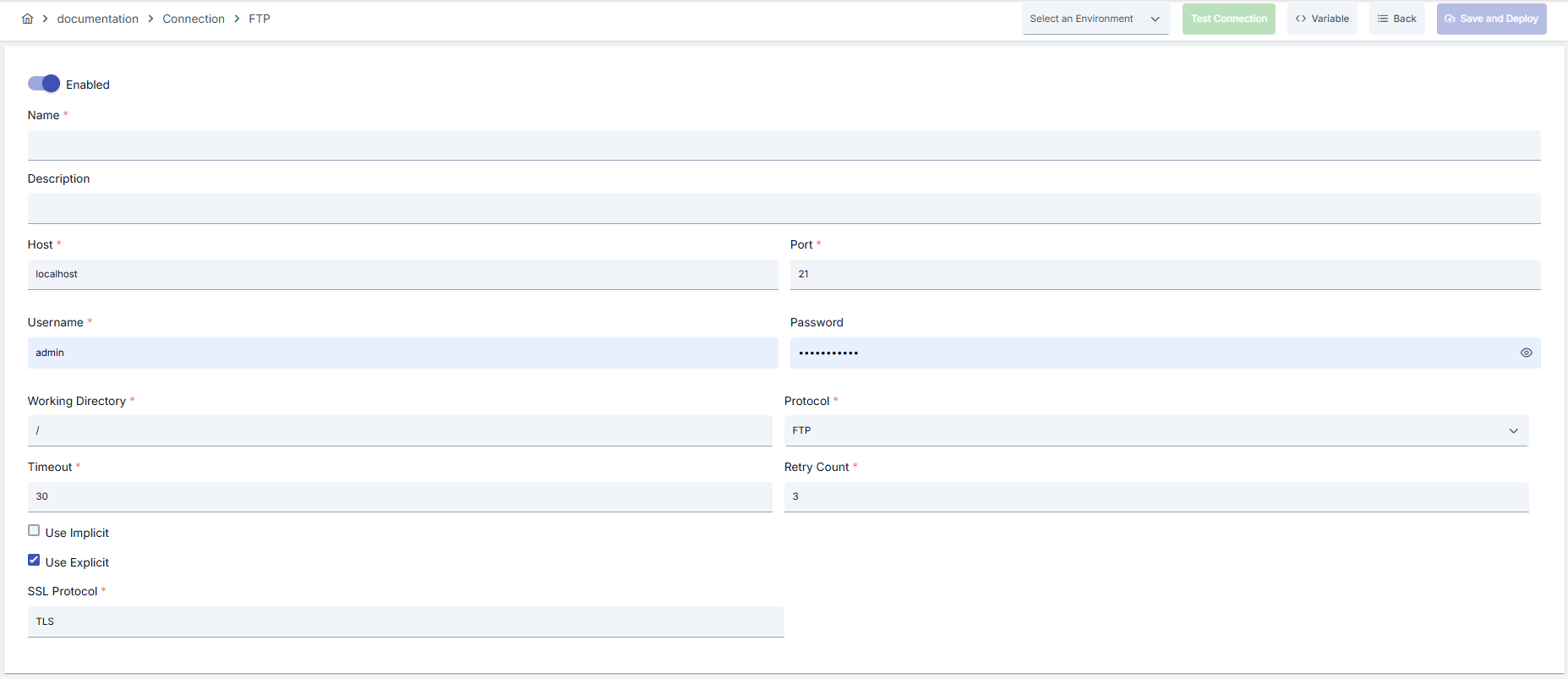
Configuration Steps
- Go to Connection → FTP Connection section from left menu.
- Click [+ Create] button in top right.
Enable Status (Active Status):
- Set active/passive status with toggle. New connections are active by default.
Name (Name) - Required:
- Example:
Production_FTP - Enter unique name, should not start with space.
- System automatically checks. Green checkmark: available. Red X: existing name.
Description (Description):
- Example: "Partner FTP uploads"
- Max. 1000 characters.
- Describe the purpose of Connection.
In the action button area at the top of the page, you can use the [<> Variable] button to select dynamic values, and with global variables, you can manage connection parameters with variable-based values instead of fixed values. For detailed information, review the Dynamic Variables page.
- Select environment from dropdown menu: Development, Test, or Production.
- Environment selection is required for Test Connection.
- Host & Port: Enter target FTP address, set port according to protocol.
- Protocol: Select FTP, SFTP, or FTPS.
- WorkingDir: Write full path of folder to be accessed.
- Username/Password: Enter username and password. You can select variable from Variable button and paste for environment variable.
- UseImplicit / UseExplicit: Select FTPS handshake type.
- SSL Protocol: Specify TLS version (e.g., TLS1.2).
- Timeout: A value between 30-90 seconds is recommended according to network delay.
- RetryCount: 3-5 recommended for unstable connections.
- Use username/password or environment variable.
- Load necessary certificates to trust store for FTPS (if using FTPS).
- Warning: Do not allow anonymous FTP access in Production environment.
- Click [Test Connection] button.
- Ensure environment is selected.
- Test whether connection parameters are correct.
- Successful: Green confirmation message
- Failed: Error details are shown
- Click [Save and Deploy] button in top right.
Checklist:
- Unique name
- Required fields filled
- Test connection successful (recommended)
Result:
- Connection is added to list
- Becomes available for use in Integration Flow and Connector steps
- Becomes active according to environment
Connection created successfully! You can now use it in Integration Flow and Connector steps.
Deleting Connection
To delete a connection:
- Go to the connection's view screen.
- Click the [Delete] button at the top right.
- Confirm deletion in the confirmation dialog.
- From ⋮ menu at end of row in connection list, select Delete.
- Confirm deletion in the confirmation dialog.
Check Before Deleting:
- May be used in Integration Flow or Connector steps.
- Assign alternative connection if necessary.
- Backup with Export before deleting.
- Instead of deleting, set connection's active status to passive.
- Connection becomes passive but is not deleted.
- You can reactivate and reuse when needed.
Exporting/Importing Connection
In this step, users can export (export) existing connections for backup, moving to different environments, or sharing purposes, or import (import) a previously exported connection again. This operation is used to maintain data integrity in version control, transitions between test and production environments, or inter-team sharing processes.
Export
- Go to the connection's view screen.
- Click the [Export] button at the top right.
- ZIP file is automatically downloaded.
The row's ⋮ menu now has two items: the primary Export opens the Export/Import Wizard with this connection preselected — any ${VARIABLE} reference in its host, URL or password field surfaces automatically on the dependency step; the secondary Export as File downloads the ZIP described below directly, without going through the wizard.
Format: {Date}-ftp-integration-{ConnectionName}-export.zip
Example: 13 Nov 2025-ftp-integration-Production_FTP-export.zip
- Connection JSON file
- Metadata information
- Dependency information (e.g., certificates, key store)
- Backup
- Moving between environments (Test → Prod)
- Versioning
- Team or project-based sharing
Import
- Click [Import FTP Connection] button on the main list — it now opens the Export/Import Wizard's import step with type Connection preselected (Admin scope when opened from Administration); the old upload dialog is gone.
- Select the exported package and follow the wizard's steps.
- The wizard checks format, name conflicts and dependency availability before you confirm the import.
Scenario 1: Name Conflict → Overwrite old connection or create with new name.
Scenario 2: Missing Dependencies → Create missing certificates or key stores first or exclude during import.
Usage Areas of Connection
Steps:
- Create Connection
- Verify connection with Test Connection
- Save and activate with Save and Deploy
- Ensure Connection is in Enabled status
Connection is selected in steps requiring file transfer with FTP/SFTP/FTPS protocol. Example: "FTP Read File", "FTP List File" steps. Connection selection is performed from Connection field in step configuration. Same connection can be reused in both file sending and receiving steps.
Connection is selected in scheduled tasks (e.g., file receiving/sending at certain intervals, log archiving) to access FTP/SFTP servers. When connection changes, job behavior is updated accordingly.
Connection Test feature allows verifying connection correctness independently from Integration Flow. This test is critical in debugging process.
Test results are not guarantee of production transfer; test Integration Flow separately
Best Practices
Things to Do and Best Practices
Bad: Giving user root directory access
Good: Only giving permission to necessary folder
Best: Defining separate workingDir for each scenario and limiting with ACL
Bad: Storing password as plain text in form
Good: Storing sensitive information using environment variable
Best: Using ${var} references with Variable button
Bad: Using default FTP in every environment
Good: Selecting SFTP or FTPS when needed
Best: Managing protocol by environment and mapping with security requirement
Bad: Using same connection parameters in all environments
Good: Creating separate connection for each environment
Best: Managing all environments in single connection using environment option, only changing environment during inter-environment transitions
Bad: Saving and deploying Connection without testing
Good: Verifying with Test Connection before saving
Best: Testing after each parameter change, performing full integration test in test environment before moving to production
Security Best Practices
Open FTP servers only to Apinizer gateway IP range, whitelist passive FTP port range if necessary
Catch unexpected manipulations by performing checksum verification after transfer
Store sensitive information such as username and password using environment variable. Do not hardcode credentials in code or configuration files. Update passwords periodically
Always enable SSL/TLS in Production environment. Use self-signed certificates only in development environment. Track certificate expiration dates and renew on time
Allow only authorized users to change Connection configuration. Store Connection change logs. Apply change approval process for critical connections
Things to Avoid
Why to avoid: Authentication is bypassed, data leakage occurs
Alternative: Define users with mandatory credentials
Why to avoid: Unnecessary delete/write permission increases risk
Alternative: Use read-only or accounts authorized only to necessary directories
Why to avoid: Selecting FTP in environment requiring FTPS causes regulation violation
Alternative: Select SFTP/FTPS according to requirement, document protocol
Why to avoid: Test data may be written to production system, real users may be affected, security risk occurs
Alternative: Create separate connection for each environment, use environment parameter, separate connection names by adding prefix according to environment (Test_, Prod_)
Why to avoid: Connection constantly times out in network delays, Integration steps fail
Alternative: Adjust timeout values according to real usage scenarios, measure network latency and determine timeouts accordingly
Performance Tips
Recommendation: Break large files into parts at Integration Flow level
Effect: Transfer time shortens, retry cost decreases
Recommendation: Use passive FTP behind firewall and narrow port range
Effect: Network issues decrease, connection stability increases
Recommendation: Measure real network latency, adjust timeout values accordingly, avoid very low or very high timeouts
Effect: Unnecessary waits are prevented, fast fail-over is provided, user experience improves
Troubleshooting
Directory Listing Failed
Wrong workingDir, user may not have listing permission, or firewall may be blocking passive port range.
Verify WorkingDir value.
Check FTP user permissions.
Open passive port range.
SSL/TLS Negotiation Error
Wrong sslProtocol value, certificate may have expired, or UseImplicit/UseExplicit may be incompatible.
Align TLS version with other party.
Renew certificate.
Select correct FTPS mode.
Connection Timeout
Network delay, target system responding slowly, or timeout value may be too low.
Check network connectivity.
Check target system health.
Increase timeout values.
Review Connection logs.
Authentication Failed
Wrong username/password, expired credentials, or permission problem may exist.
Verify credentials.
Check that user is active in target system.
Check that necessary permissions are granted.
Check SSL/TLS certificates.
Connection Test Successful But Integration Flow Gives Error
Different connection may be selected in Integration/Connector step, step may be incorrectly configured, or Flow/Job may not have been redeployed.
Check that Connection's enable toggle is active.
Verify that correct connection is selected in Integration Flow.
Redeploy Connection.
Redeploy Integration Flow or Job.
Check Gateway logs.
Frequently Asked Questions (FAQ)
Do I have to define separate connection for FTP and SFTP?
You can change protocol in same connection but creating separate environment parameters for each protocol increases traceability.
Does changing working directory later affect flows?
Yes, all file paths used in Flow must be updated according to new workingDir; otherwise you will get "file not found" error.
Where can I manage passive FTP port range?
Port range is defined on FTP server, same range must be opened in firewall on gateway side. You can note this in Connection document for information purposes.
How do I bind SFTP key file?
SFTP connection supports only username and password authentication. SSH key-based authentication is not supported in the current version.
Can I use same connection for both download and upload?
Yes, as long as user permissions allow both operations; same connection can be selected in Integration Flow steps.
Can I use the same connection in multiple Integration Flows?
Yes, the same connection can be used in multiple Integration Flow or Connector steps. This provides central management and guarantees configuration consistency. However, care should be taken as changes made to connection will affect all usage locations.
Should I create different connections for Test and Production?
Yes, it is recommended that you create separate connection for each environment. Alternatively, you can manage all environments within a single connection using environment parameter. This approach provides easier management and less error risk.
Test Connection successful but not working in Integration Flow, why?
Several reasons may exist:
- Connection enable toggle may be passive
- Different connection may be selected in Integration step
- Connection may not have been deployed
- Integration Flow may not have been redeployed yet